




 Total:

Term Dates | 2026
Monday 2nd February -
Thursday 2nd April
Public Holiday | School Closed
Waitangi Day | Friday 6th February
Teacher Only Day | School Closed
Friday 20th March
Monday 20th April -
Friday 3rd July
Public Holidays | School Closed
ANZAC Day (observed) | Monday 27th April
King's Birthday | Monday 1st June
Teacher Only Day | School Closed
Friday 29th May
Monday 20th July -
Friday 25th September
Monday 12th October -
Monday 14th December (2pm)
Public Holidays | School Closed
Labour Day | Monday 26th October
Term Dates | 2027
Tuesday 2nd February -
Friday 9th April
School Closed
Waitangi Day Observed | Monday 8th February
Good Friday | Friday 26th March
Easter Monday | Monday 29th March
Easter Tuesday | Tuesday 30th March
Tuesday 27th April -
Friday 2nd July
School Closed
ANZAC Day Observed | Monday 26th April
Teacher-Only Day | Friday 4th June
King's Birthday | Monday 7th June
Matariki | Friday 25th June
Monday 19th July -
Friday 24th September
School Closed
Teacher-Only Day | Friday 20th August
Monday 11th October -
Thursday 16th December
Public Holidays | School Closed
Labour Day | Monday 25th October
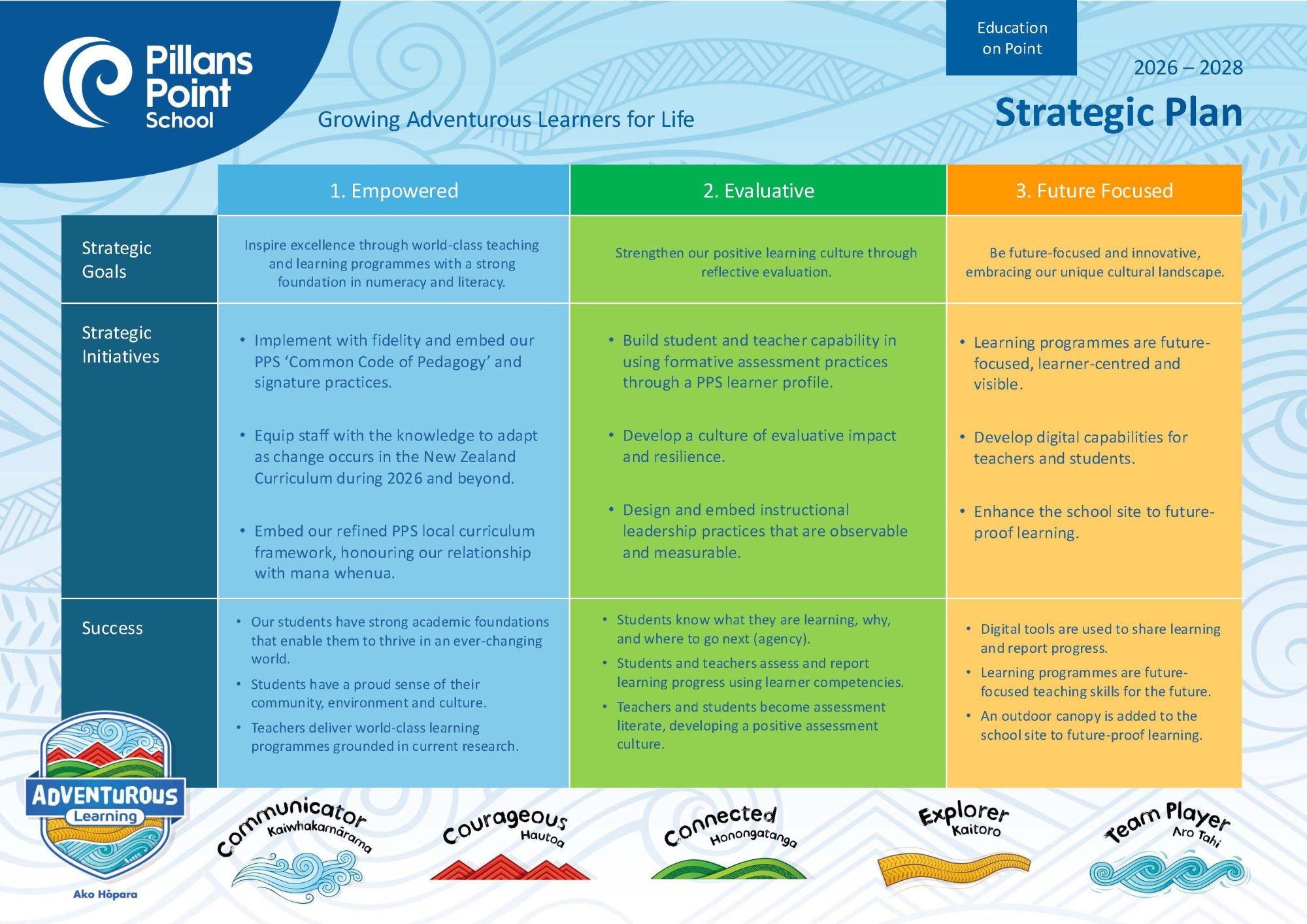
2026 - 2028 Strategic and Annual Plan
Please click on the image below to download the full copy of our 2026-2028 Strategic and Annual Plan.

Policies
All of the School's policies and procedures are now available online. Just click here to be taken directly to our policies and procedures.
The site requires a user name and password to gain access. The required user name is pillanspoint and the password is pillans
To Review a Policy:
- Follow the blue link to "Schooldocs" and log in using the user name (pillanspoint) and the password (pillans).
- Look for the red print and click on 'currently under review'. This is situated in the middle of the page.
- Select a policy and read it. You only need to review the grey printing at the top of the page as the supporting documentation will be reviewed at a later date. (If you choose to you may read the supporting documentation by clicking on the red print).
- Click on the Review Policy button (top right of page, bold black print).
- Log in by choosing your category in the drop down menu; either Parent, Staff Member or Board Member.
- Secondly write your name (optional).
- Complete the response form.
For families without Internet access a review form can be collected form the office.
Thank you for taking the time to respond, your participation is appreciated.
Copyright: Except where stated, the content on this site is the copyright of SchoolDocs Ltd. It may not be reproduced without written permission from SchoolDocs Ltd.

Uniform
Pillans Point School has teamed up with Kukri to supply our school uniform. The School Uniform can be tried on at School and purchased either at School or online.
sKids | Before and After School Care
We’re proud to partner with sKids (Safe Kids in Daily Supervision), New Zealand’s trusted Out of School Care provider with over 30 years of experience supporting families nationwide. Conveniently located onsite at our school, sKids provides a safe, engaging and supportive environment for our students beyond the classroom.
Their programmes include after school care Stay and Play, and their action-packed holiday programme Holiday HQ. Each term offers fresh and varied activities and themes giving children opportunities to play, learn and grow in a fun and supervised setting.
All sKids programmes are eligible for government subsidies (the OSCAR Subsidy) on the cost of care, making quality care more accessible for families.
Click here for more information.
To learn more about sKids, explore programme details, and book sessions, visit their website here or contact their friendly team directly.
Customer Service Email: hello@skids.co.nz
Customer Service Phone Number: 0800 274 172
Website: www.skids.co.nz/locations/pillans-point
Site Phone Number: 027 242 5763


Community Pool Use
POOL ACCESS OUTSIDE OF SCHOOL HOURS - 25/26 SEASON
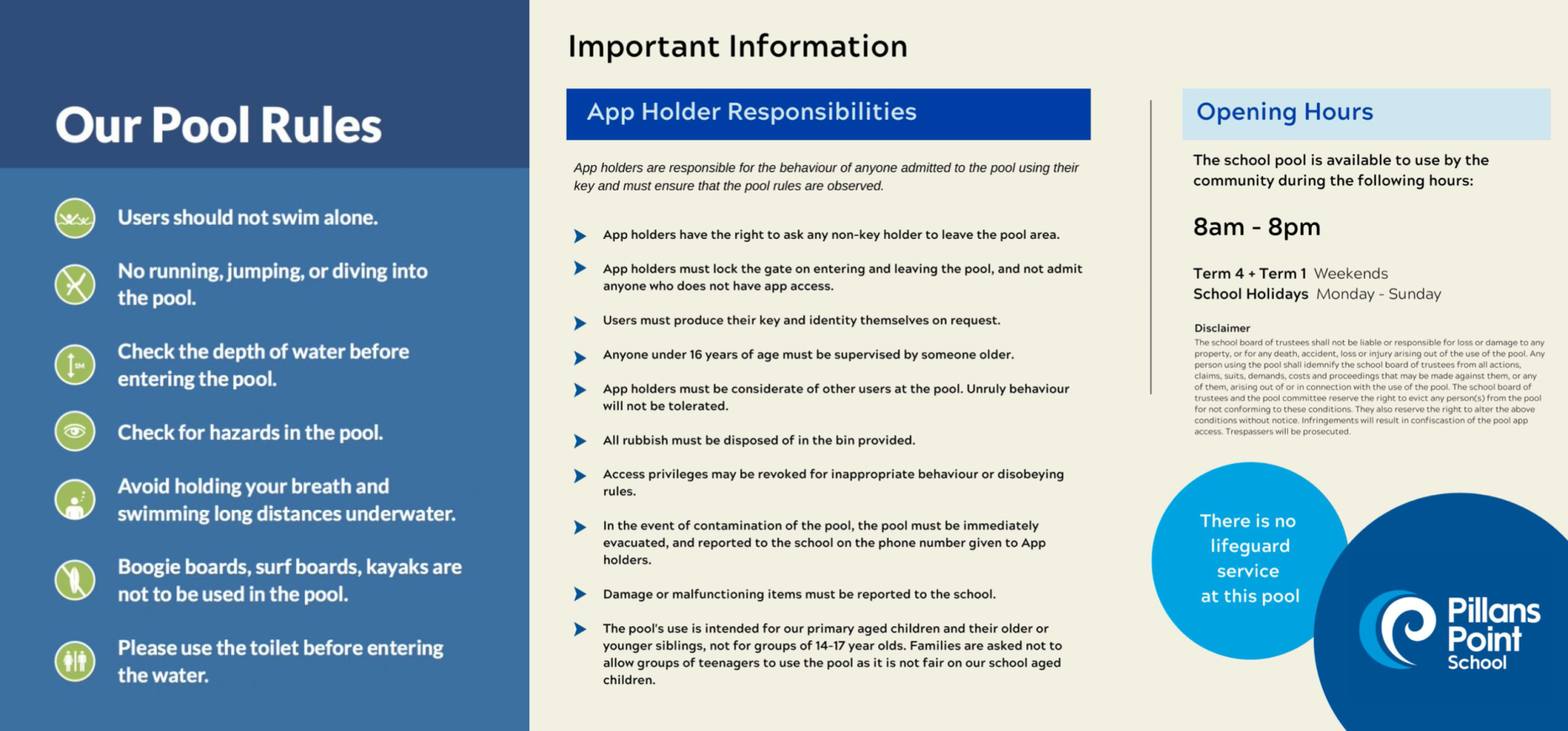
Pillans Point School views the school pool as a resource for the community, outside of school hours. Each summer, the school sells pool access to members of our school community via the PalGate app.
When people share a communal space like a pool, it's important for everyone to be considerate and follow the rules and etiquette to ensure a positive and enjoyable experience for all.
Please note: Dogs are not allowed inside the pool gates or in the pool itself.
DETAILS FOR THE 25/26 SEASON
Pool Hours:
8am - 8pm on Weekends and Holidays
4:30pm to 8pm on School days (allows uninterrupted time for sport teams)
*please note these are strict times and your app will be set for the above. You will not have access to the pool outside of these hours. Specific dates apply also.
For Health and Safety reasons, there will be a maximum of 75 Pool accesses sold to the community.
SECURITY & PALGATE APP
Our school pool has 24/7 security camera coverage that we will use in the case of misuse of the pool area.
Pool access will be through the use of the PalGate App. Once you have registered and paid for pool access by completing the form below; you will be emailed instructions on how to download & use the PalGate app. * The app is locked to your phone number, so please choose the most commonly used device at signup. Two devices per pool payment (both users must be within the family group).
Once you have downloaded and set the app up; you will have access to the pool.
The app will only work if you are 1m or less away from the pool gate, and are connected to the internet.
Click on the relevant icon below to download the app for your phone.


Please ensure if you are the last person in the pool that you put the cover back on. This can be done by one strong person but works best/smoother with two people (one to lift from the roll and one to pull). This helps us keep costs down, keeping in the warmth and reducing the need for excess chemicals.
Pool Access Registration Form
Please note - you have to complete payment at the end of this registration form. If you don't make payment when prompted after completing the form; your registration will not be sent to us to process.